Guide · 5 min read
Onion skin, explained
The feature that makes frame-by-frame animation possible on a screen — and the detail most apps get subtly wrong.
What onion skinning is
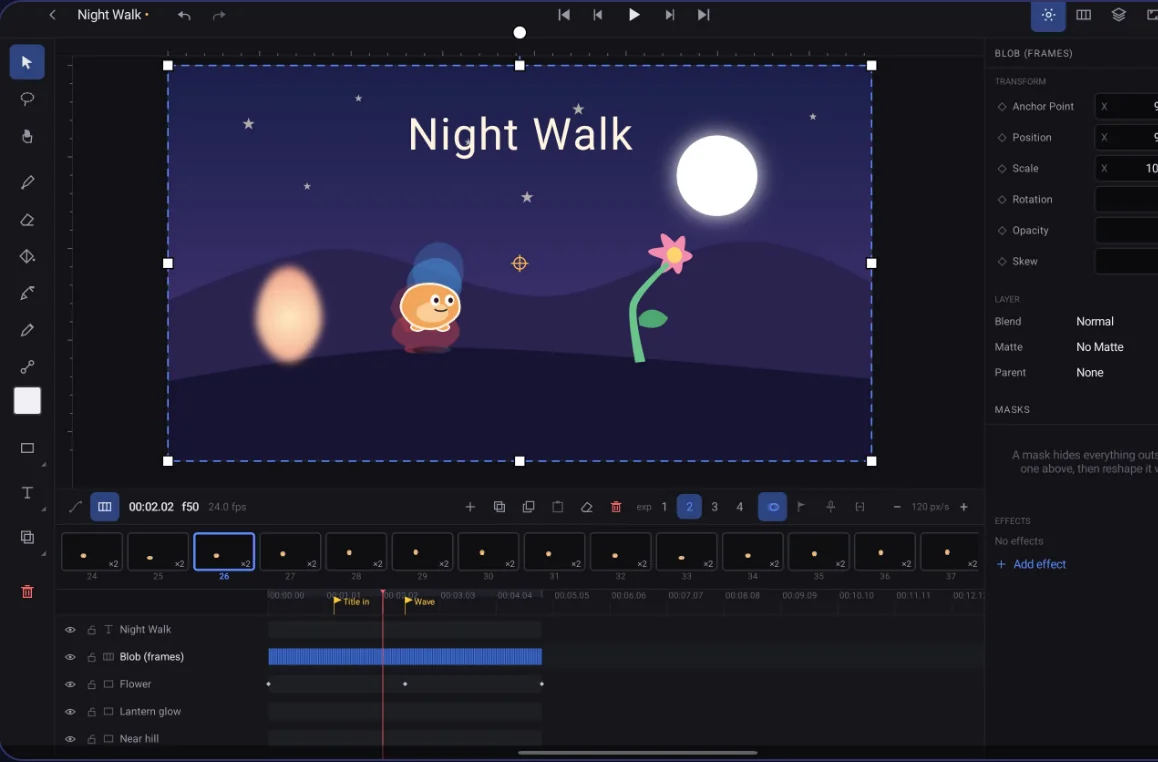
Before computers, animators drew on thin paper over a light table, so they could see the previous drawing through the sheet they were working on. The paper was called onion skin. Digital apps imitate it: around the current drawing they show faded “ghosts” of the drawings before and after it.
The ghosts let you judge spacing — how far something moves between drawings — and keep shapes consistent, so a head does not grow and shrink as it turns.
Drawings, not frames
Hand-drawn animation is rarely “on ones” (a new drawing every frame). Most of it is on twos: every drawing holds for two frames. Fast actions go on ones, slow holds on threes or more.
Here is the trap. If the onion skin counts frames, then on twos “one frame back” is often the same drawing you are on — the ghost sits exactly under your line and tells you nothing. You have to raise the range to see anything, and then the ghosts on ones-sections become a blur.
AnMotion’s onion skin counts drawings. One back is always the previous drawing, whatever its exposure. Stepping uses the same rule: the next/previous buttons jump between drawings, not frames.
Settings that keep it readable
| Setting | Start with | Why |
|---|---|---|
| Drawings back | 2 | Enough to read the arc of motion without clutter. |
| Drawings forward | 1–2 | Useful when you are in-betweening between two keys. |
| Strength | 30–40% | Ghosts must never compete with the line you are drawing. |
| Tint | Different colours before and after | You instantly know which side of you a ghost is on. |
How to in-between with it
- Draw two key drawings — the extremes of a movement.
- Add an empty drawing between them. With range 1 back and 1 forward you see both keys.
- Draw the in-between where the motion needs it — halfway for even spacing, closer to one key to ease into it.
- Flip back and forth with the step buttons, then play it to check.
Onion skin works on drawn layers. Vector layers animated with keyframes do not need it — their in-betweens are calculated. See keyframes and easing.
Draw it. Then make it move.
The whole app is free with one project. One purchase, no subscription, unlocks as many as you like.
Free on Google Play · Android tablets