Switching apps
Coming from Alight Motion? Motion graphics, plus a real flipbook.
If you edit with keyframes on Android and want to draw your own animation too — or simply want an app sold without a subscription — here is how AnMotion compares, honestly.
What will feel familiar
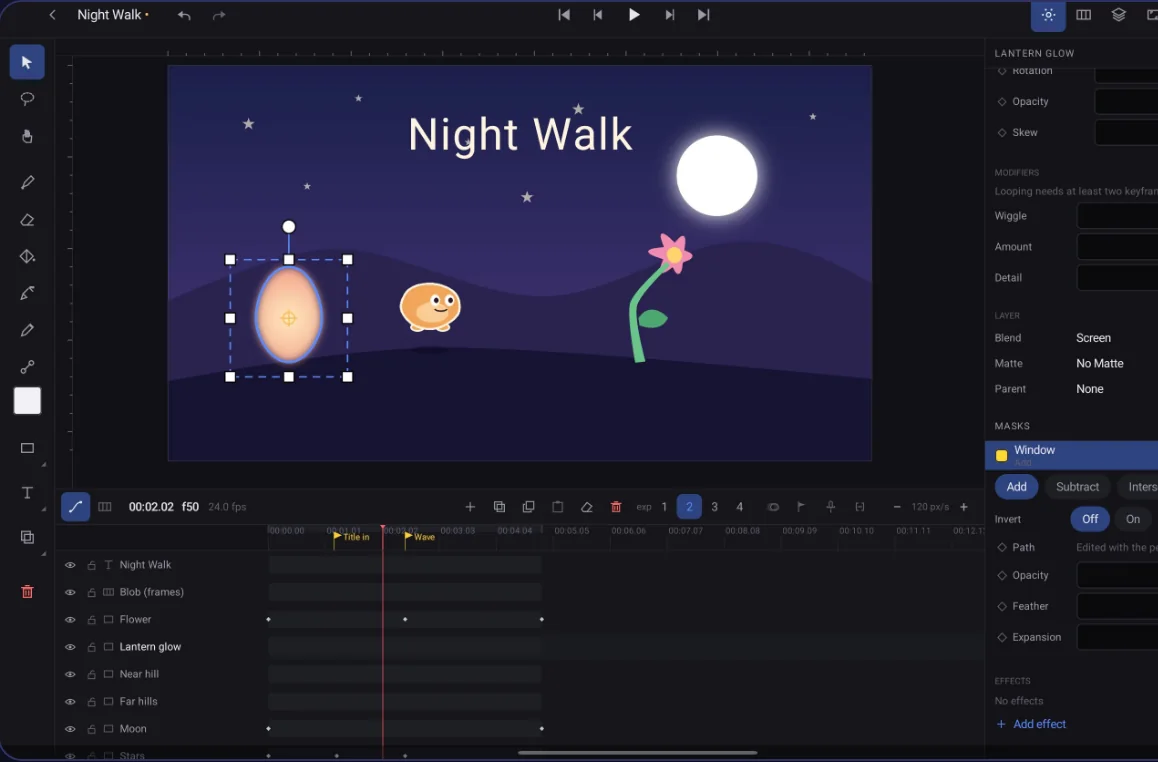
- Layer-based editing with keyframes on every property and an easing curve editor.
- Vector shapes, text, masks, blend modes and effects such as blur, glow and drop shadow.
- Imported images, video and audio, and export to MP4 or GIF.
What is different
- Frame-by-frame drawing is a first-class half of the app: low-latency pressure ink, onion skin counted in drawings, exposure on twos, a line-aware fill bucket.
- Bones with inverse kinematics and puppet pins for vector layers.
- Alpha and luma track mattes, mask modes with feather and expansion.
- Exact frame rates — 23.976 and 29.97 are rational, not rounded, so sound stays in sync on long edits.
- PNG sequence export alongside H.264, HEVC and GIF.
No watermark, no subscription
Many people search for a “pro” version or for exports without a watermark. In AnMotion the free version already exports without a watermark, at every quality, in every format. Its only limit is one project at a time — a single one-time purchase removes that. Nothing renews. Details on pricing.
When it is not the right fit
- You edit on a phone or an iPhone. AnMotion is for Android tablets only.
- You want a PC version. There is none — but on a Samsung tablet, DeX gives you a mouse, keyboard and right-click menus.
- You rely on downloadable presets and project sharing. AnMotion has no online library or accounts; projects stay on your device.
Draw it. Then make it move.
The whole app is free with one project. One purchase, no subscription, unlocks as many as you like.
Free on Google Play · Android tablets