Guide · 7 min read
Keyframes and easing
Set a value at two moments and let the app do the rest. Then learn why the default in-between almost always needs a curve.
What a keyframe is
A keyframe stores a property’s value at a moment in time: position (200, 540) at 0:00, position (1700, 540) at 2:00. Everything between two keys is interpolated — calculated by the app. Change a key and every in-between updates.
In AnMotion every animatable property has a stopwatch, and the rule is always the same: if a property already has keys, changing it adds a key at the playhead; if it has none, the change just sets its value.
Why linear motion looks robotic
Linear interpolation moves the same distance every frame. Nothing in the real world does that: objects speed up from rest and slow down before stopping. The fix is easing:
- Ease out (of the first key) — start slowly, then accelerate.
- Ease in (to the second key) — decelerate into the stop.
- Ease in and out — both; the default for most UI and logo motion.
- Exponential — a sharp, snappy acceleration, good for things that whip into place.
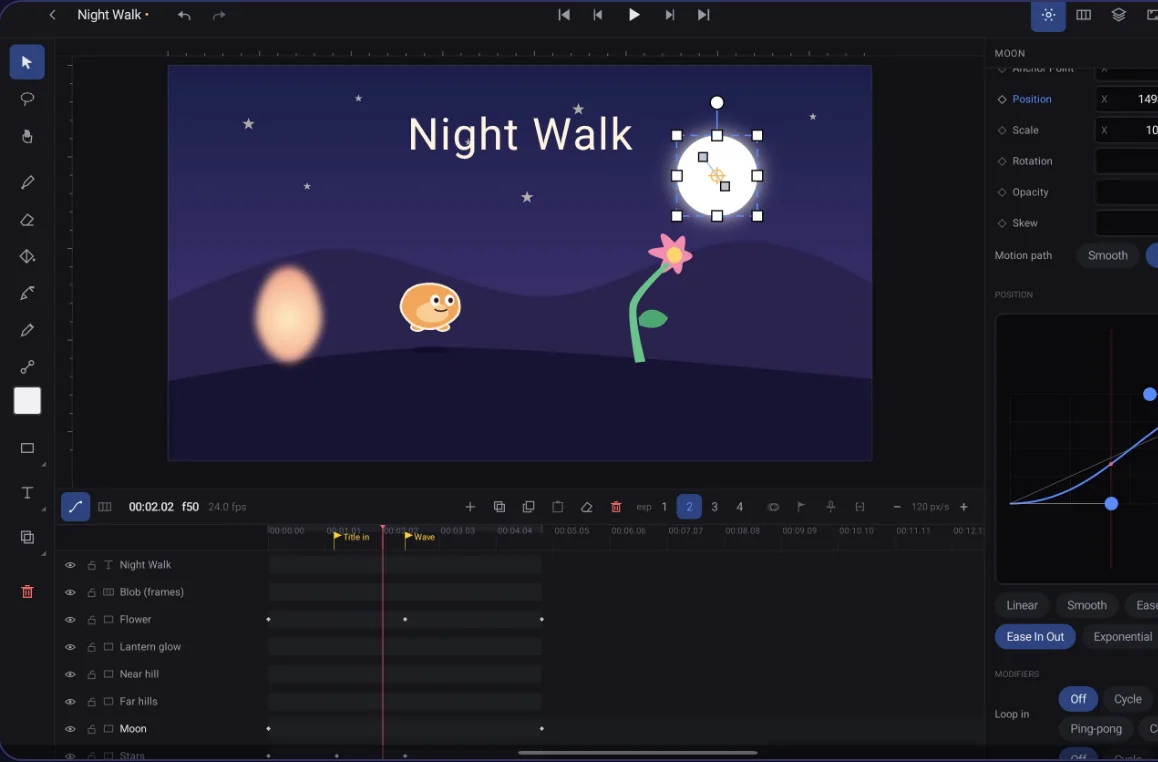
The curve editor shows the segment under the playhead. A steep part of the curve is fast motion; a flat part is slow. Drag the handles to shape it, or start from a preset.
Beyond two keys
Loops
Animate one cycle, then let it repeat: cycle repeats it, ping-pong plays it forward then backward, offset repeats it while accumulating the change (a wheel that keeps rolling), and continue carries the last velocity on past the final key.
Wiggle
Wiggle adds controlled randomness on top of keys — handheld camera, a floating balloon, a nervous character — with an amount and a level of detail.
Motion paths
When position is keyed, its path appears on the canvas as a curve. Drag the handles to turn a straight line into an arc — most natural motion travels in arcs.
Parenting
Parent a layer to another and it inherits the parent’s motion. Animate a car body, parent the wheels, and only the wheel rotation needs its own keys.
Keyframes on drawn layers
Here AnMotion differs from most motion apps: a frame-by-frame drawn layer takes keyframes too. A walk cycle drawn on twos can be keyframed across the screen, scaled into the distance and blurred as it passes the camera — all on one timeline. See how to animate for a worked example.
Draw it. Then make it move.
The whole app is free with one project. One purchase, no subscription, unlocks as many as you like.
Free on Google Play · Android tablets